Getting Started
This page details how to get started with MDonatello.
Installation
The mdonatello package is directly installable from the source.
First clone the repository:
git clone https://github.com/talagayev/MDonatello
Create a virtual environment and activate it:
conda create --name mdonatello
conda activate mdonatello
Then go into the MDonatello folder:
cd MDonatello
Finally install of the necessary packages with the following command:
pip install .
Usage
To use the mdonatello package you need to run a jupyter notebook, thus run the command
jupyter notebook
Now that you started a jupyter notebook create a notebook file and enter the following command to use mdonatello:
import MDAnalysis as mda
import mdonatello
from mdonatello import MoleculeVisualizer

u = mda.Universe("input.pdb")
ag = u.select_atoms("resname UNK")
visualizer = MoleculeVisualizer(ag, show_atom_indices=False, width=-1, height=-1)
Some Modifications may be required to obtain the visualization of your ligand:
Adjust the code to use your PDB File instead of input.pdb.
Select the ligand that you want to view by adjusting the name resname UNK to the resname of your ligand
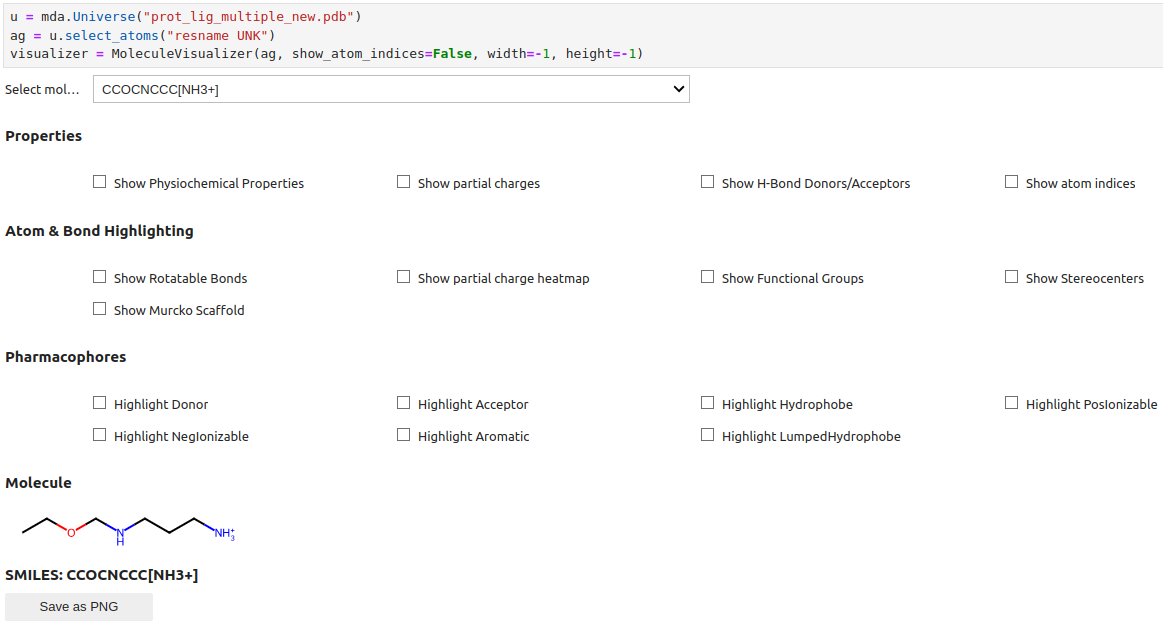
Here is an example how the visualization should look like: